
Integrate Watt with Claude
Watt runs inside Claude using the Watt plugin and its bundled Signal Graph connector. Configuration depends on your account — pick the path that matches yours.
Want a guided walkthrough? The setup wizard asks how your Claude is set up and shows just the steps you need — personal, company-managed, or admin — then hands you off to /watt:configure. The pages below are the full reference for each path.
Claude organizations
Team and Enterprise accounts have slightly different configuration settings, and some options are only available to administrators. Pick the path that matches your role.
Org user
For individual members of a Claude Team or Enterprise plan.
Org configuration
Allow use of Watt within your Claude organization. Requires Owner role.
Org-wide installation
Automatically install and sync updates to all team members. Requires Owner role.
Not sure which to pick?
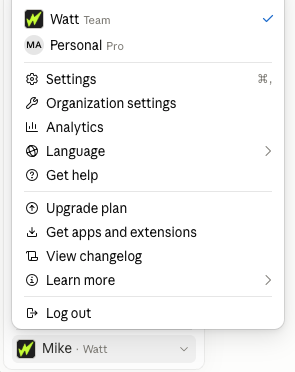
In Claude, click your account in the lower-left corner and open the menu. Your plan is listed there at the top — Free, Pro, or Max for personal accounts, or your organization's name with a Team or Enterprise plan. If you see an organization, follow one of the Claude organizations paths above; otherwise start with Personal account.